How Tourlio organises your business

Tourlio connects the plan on your desk with what happens in the vehicle — one continuous system, shaped around the way the work actually runs.

01 — Dispatch

Who drives which tour, and when?

Set up tours, assign drivers, and see in the week grid at a glance where next week is still short of someone — or where someone is assigned who cannot make it.

Replaces the evening round of WhatsApp messages to every driver.

All details
  • Real weekdays, clear warnings A tour does not run every day. If the assignment does not fit the weekdays, the driver is absent or the vehicle is booked twice, Tourlio says so when you save — you can still override it.
  • The driver steps in on their own If a colleague drops out in the morning, another driver starts the uncovered tour from the app or takes over the assignment — you do not have to be at the computer at six.
  • Separated business data Your figures run in a closed area, separated from every other business.
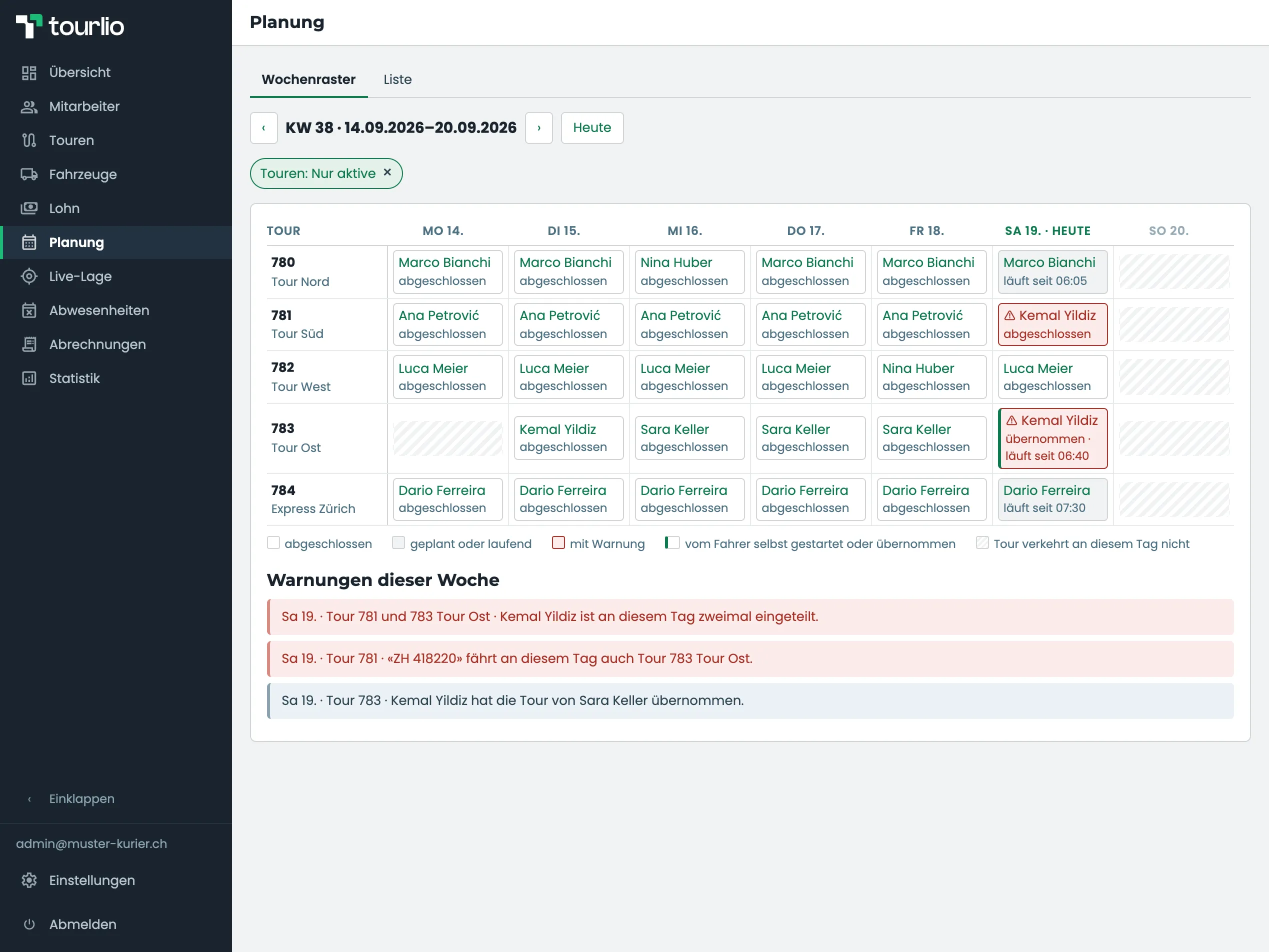
Week grid of the planning area: five tours as rows, Monday to Sunday as columns; each cell names the assigned driver and his state, on Saturday two cells outlined red and one of them marked as taken over, Sunday hatched; below the grid the three warnings of the week spelled out.
Sara is off sick, Kemal has taken over her tour and is therefore driving two tours on Saturday with the same van — the week is set, with every warning in view.
02 — Capture

Parcels and receipts come out of the vehicle.

No more collecting slips of paper. Drivers start the tour, enter their counts, photograph the fuel receipt and finish — from their phone, the same day.

Replaces the crumpled tour sheet on a Saturday.

All details
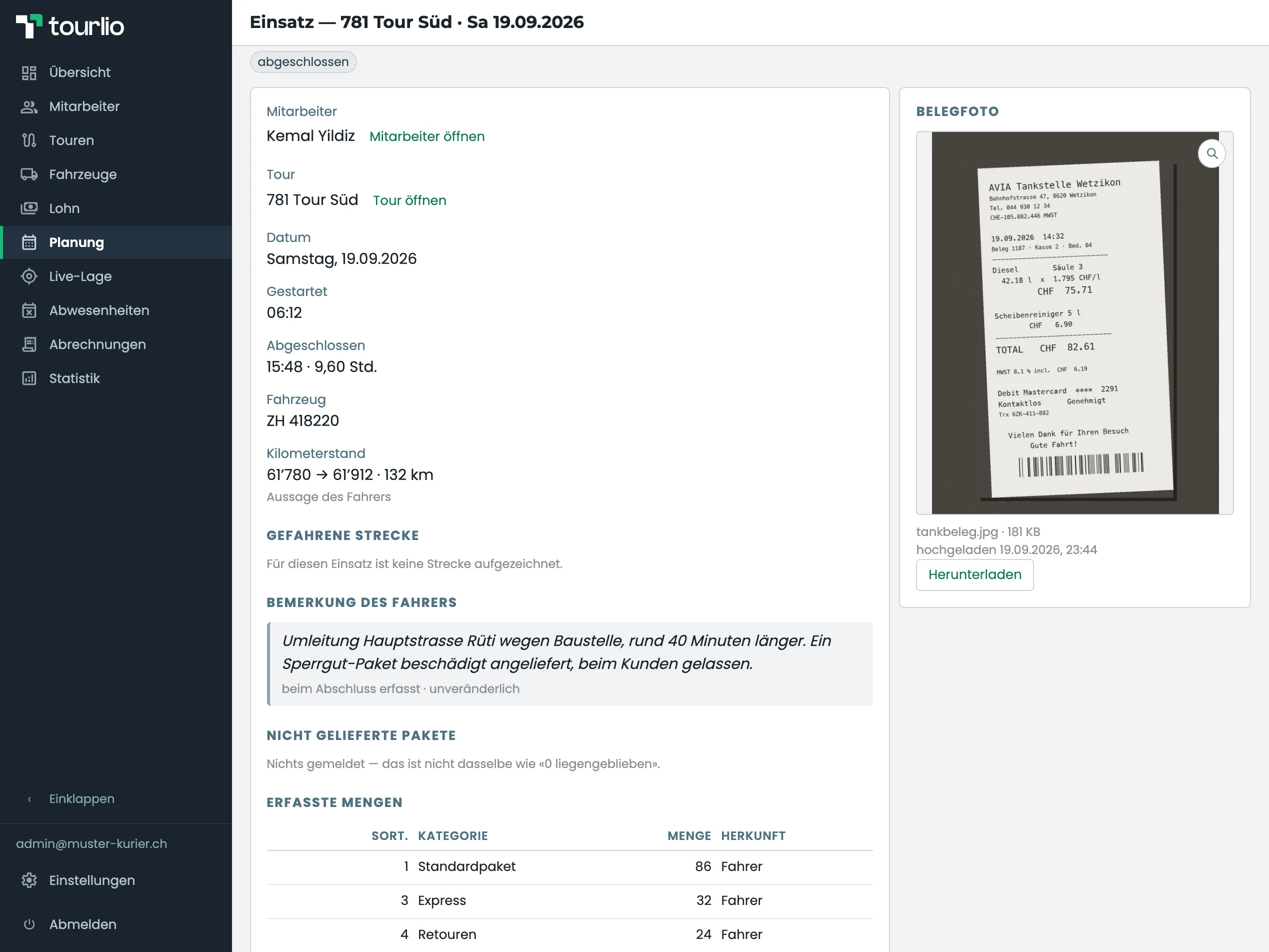
  • Counts, receipt and mileage the same day The driver records the parcels per category, the odometer at start and end, and a photo of the fuel receipt — the same evening, not at the weekend.
  • Corrections stay visible Every later change to a figure is logged with the time, the name and the reason. If a driver forgets to finish, you complete it for them — and that goes into the log too.
  • A direct line For any assignment the driver can leave a note. It sits on the assignment and on the statement, and cannot be changed afterwards.
  • What stays behind is recorded too If the driver could not deliver some parcels, they report the count when they finish — with a reason, if they have one. It sits on the assignment and on the statement. No amount is derived from it by itself; what follows from it is your decision.
Assignment detail: on the left the driver, tour, date, start and end time, vehicle and odometer readings, below them the driver’s note and the recorded quantities per parcel category with an “origin” column; on the right the photographed fuel receipt.
142 parcels, 132 kilometres, one fuel receipt and one note: “Main road in Rüti diverted for roadworks, about 40 minutes longer …” All from the same day.
03 — Absences

Sick leave and holidays without the scramble.

Absences live in one place: holiday requests wait for your decision, sick reports apply at once. If a tour is left uncovered, Tourlio tells you.

Replaces the sick note lost in the glovebox.

All details
  • Visible gaps When a driver reports sick, Tourlio checks the plan and shows which assignments are affected — in the request, in the week grid and in the month calendar.
  • Medical certificates in view The driver uploads the certificate in the app; for every sick report you see whether it is on file.
  • Back early? Shorten, don’t delete Sick until Friday, back on Wednesday: the running absence is shortened, the plan stops warning from the new end date — and the history stays.
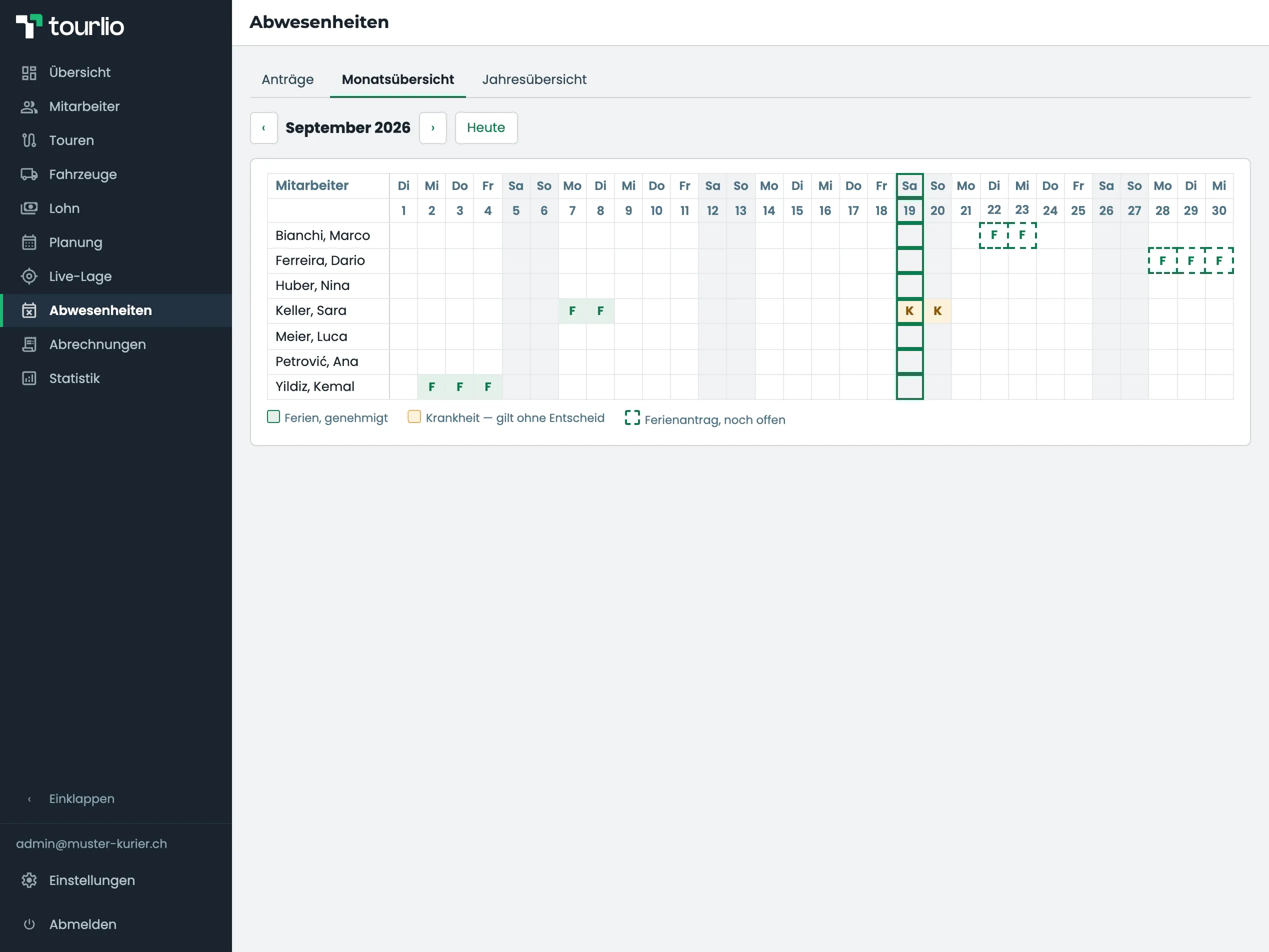
Month view of absences: employees as rows, the days of September as columns; approved holidays filled green, two sick days marked orange, open holiday requests as dotted green cells, with the legend of the three colours below.
Kemal and Sara have been on holiday, Sara is off sick now, Marco and Dario have requested holiday — the month at a glance, open requests dotted.
Around the month

What else belongs to it.

Six areas that do not fit the cycle and still belong to it — most of them every day, the last one only once. All in the same admin web, all in every plan.

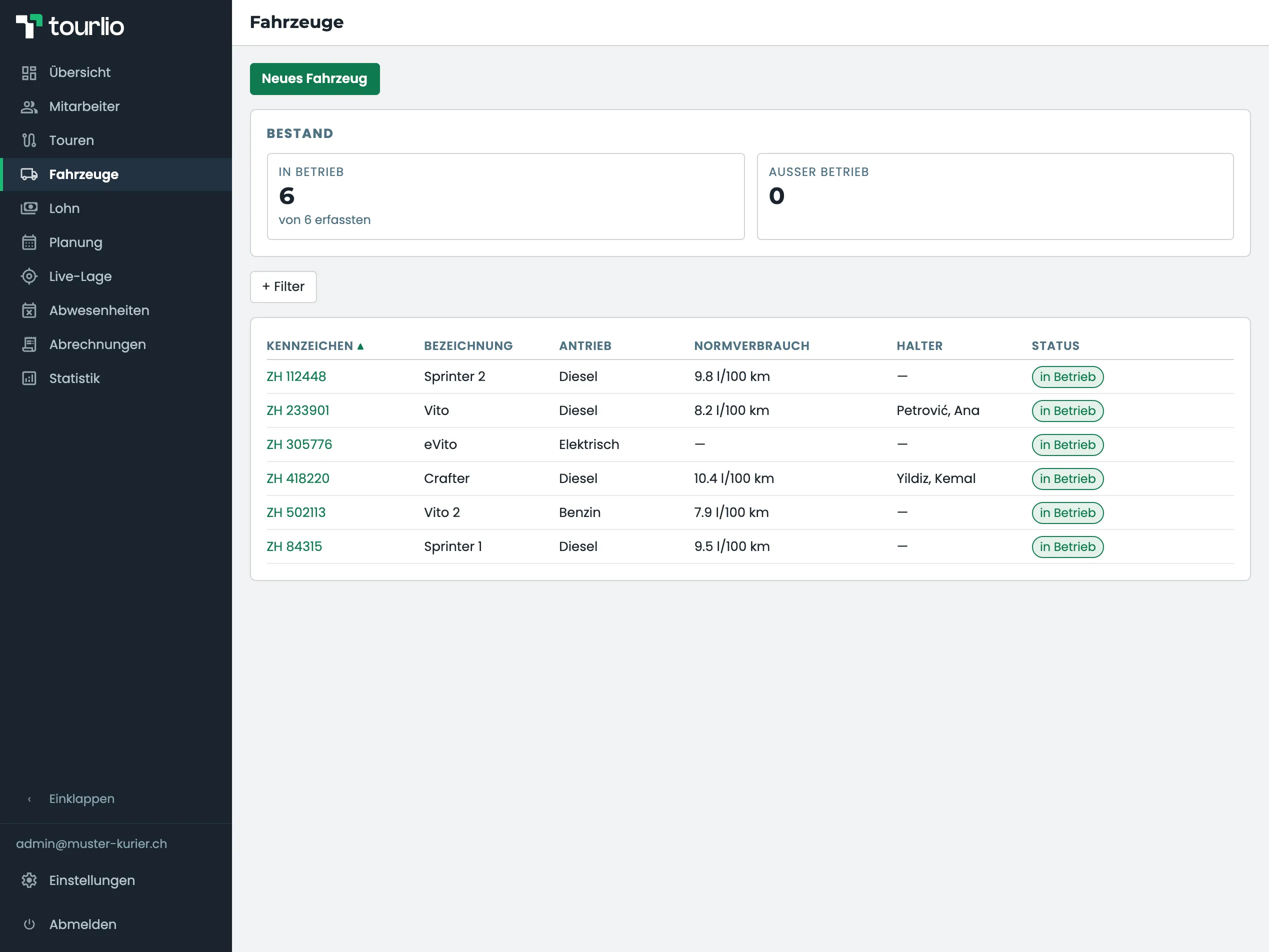
Vehicle list with six vehicles: plate, name, drive type, standard consumption, keeper and status “in service”, above them the counters for vehicles in and out of service.
Vehicles · Fleet

Vehicles and mileage

Every vehicle with its plate, drive type, standard consumption and keeper. The driver picks it at the start, the odometer readings sit on the assignment — and a vehicle booked twice shows up in the plan.
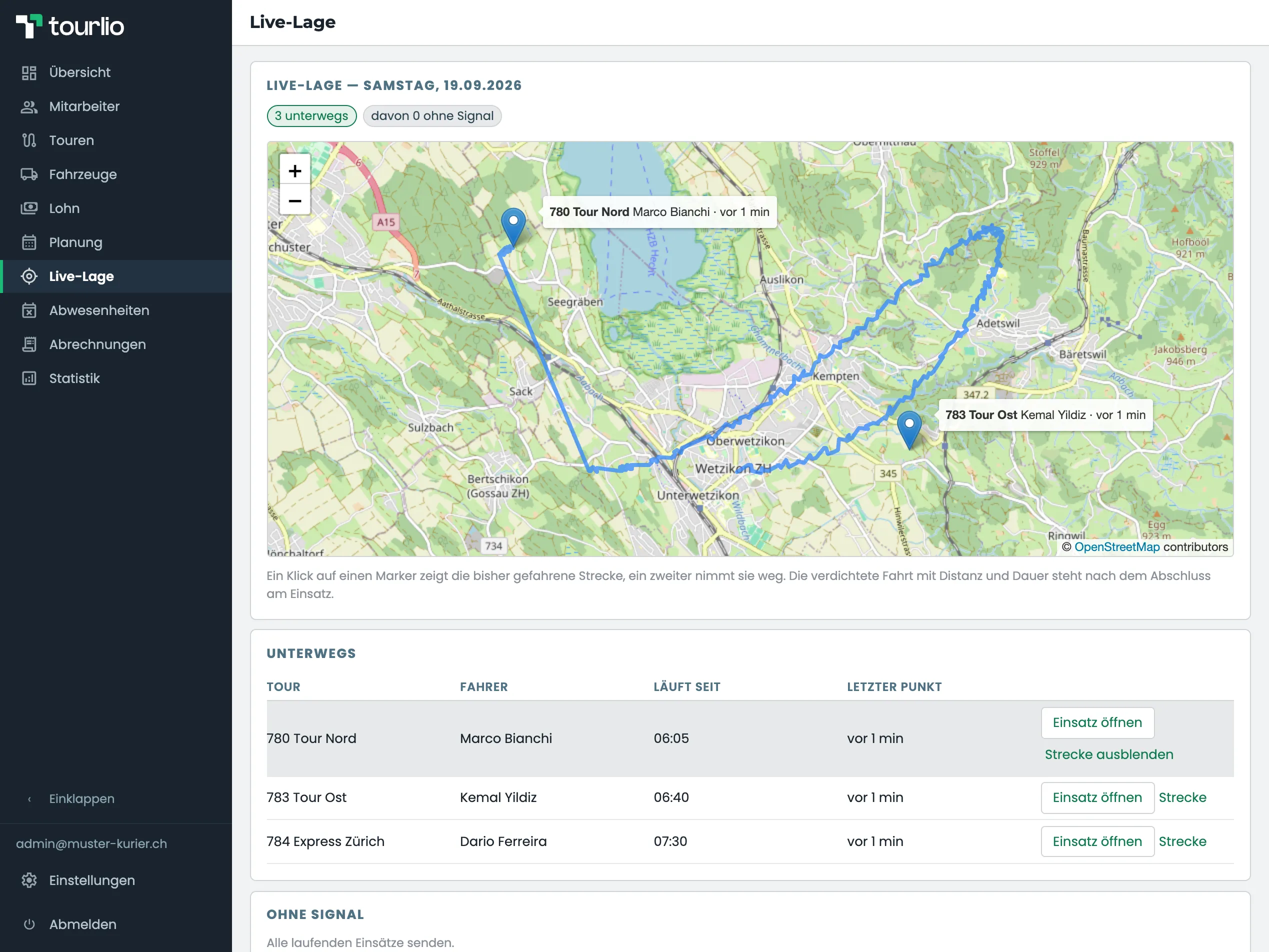
Live map of the Zurich Oberland, two of the three drivers in frame as markers with tour, name and “1 minute ago”, plus the route of one of them drawn in blue; above it the counters “3 on the road, 0 of them without a signal”, below it the list of all three running assignments.
Live map · Saturday

Live map

Who is on the road right now, and where? The map shows the running assignments; a click on a driver shows the route driven so far. Recording happens only during an assignment and only with the driver’s consent — they can switch it off themselves, you see the state.
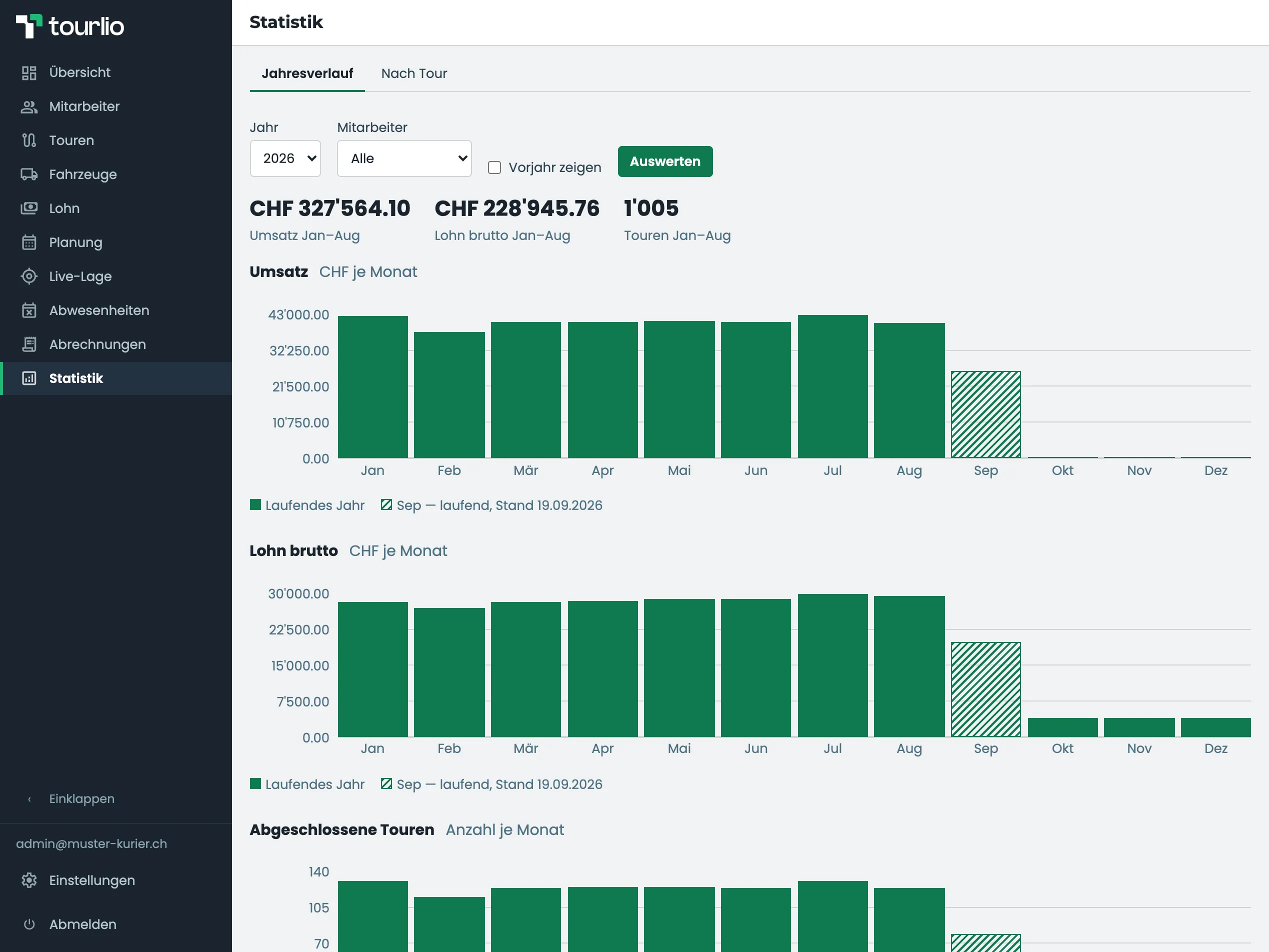
Year curve 2026: at the top the key figures for revenue, gross pay and tours from January to August, below them the bar charts for revenue and gross pay per month with the running September hatched; the third chart for completed tours begins at the bottom edge.
Statistics · 2026

Statistics

Revenue, pay and tours per month as a year curve, with the previous year beside it and per employee — and the evaluation by tour that tells you which tour pays for itself.
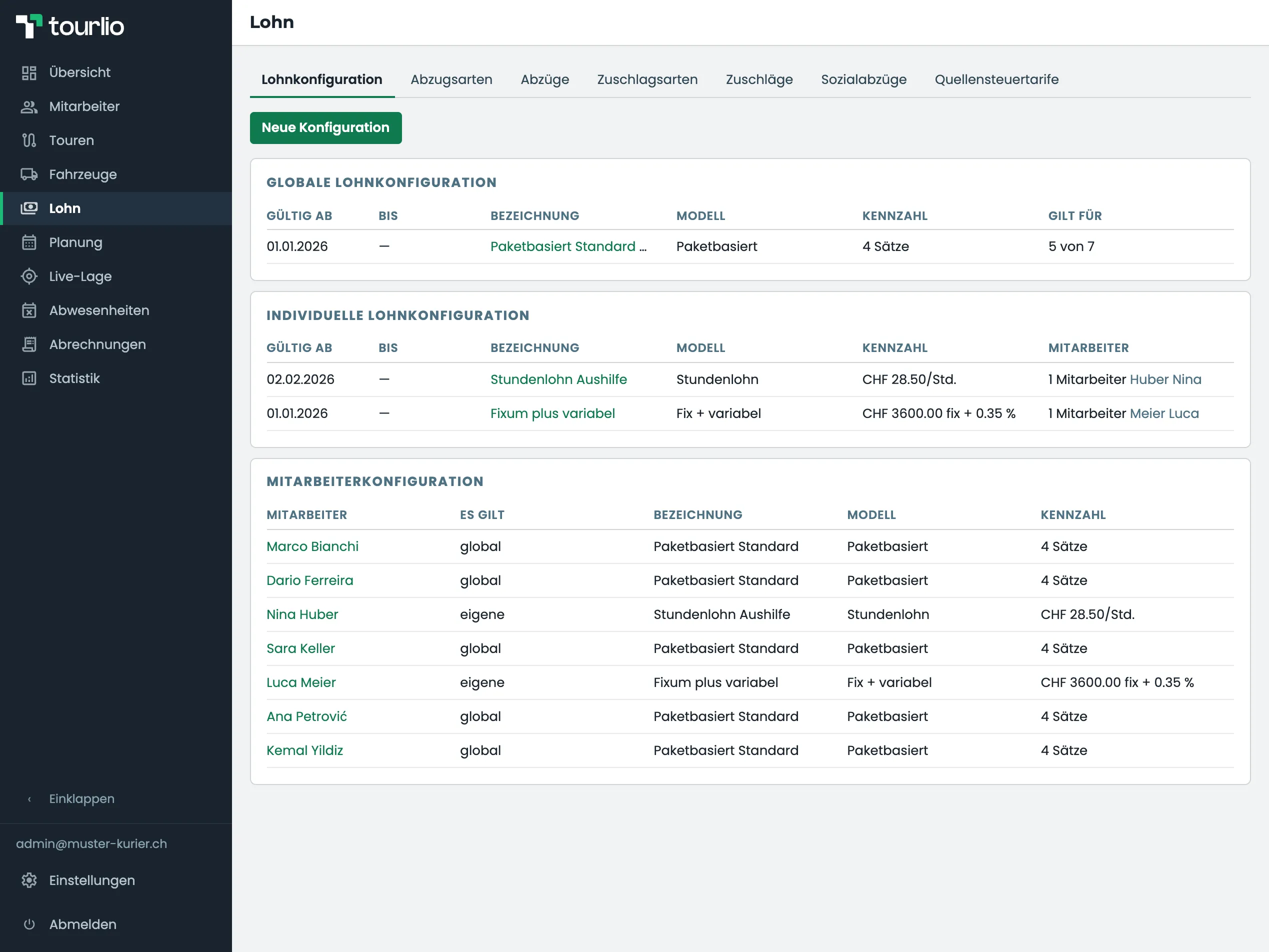
Pay configuration: one global rule “Paketbasiert Standard”, two individual rules (hourly, fixed plus variable) and the table showing which rule applies to which employee.
Pay · Configuration

Pay and deductions

One global rule for everyone, own rules for individual drivers, each valid from a date. The table tells you per employee what applies today — and a change from 1 October leaves September alone.
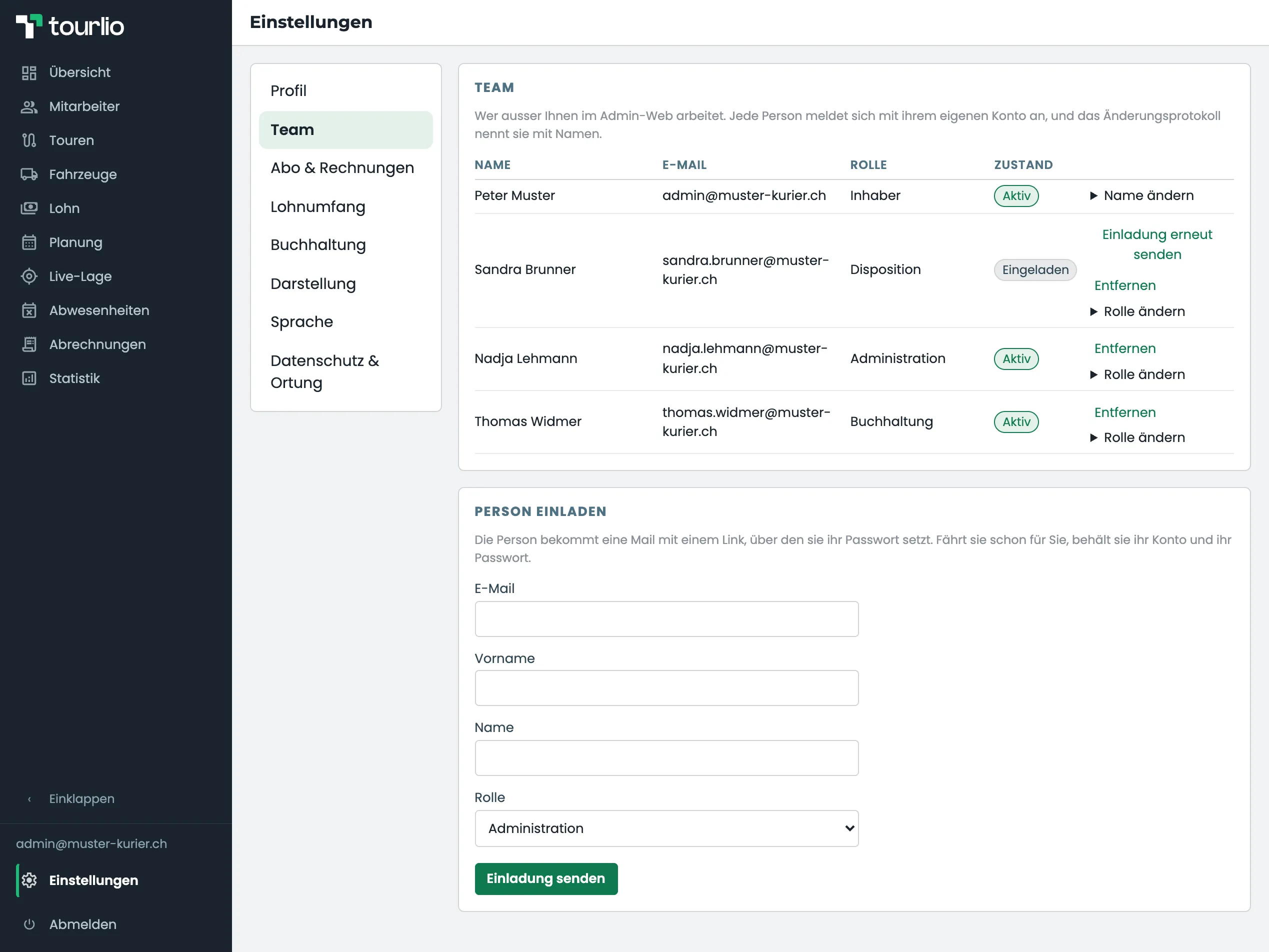
Settings → team: a table with four rows and all four roles — owner, dispatcher, administrator and accountant —, three of them active and one invited, each row offering to remove the person or change the role; below it the form for inviting someone with e-mail, first name, surname and a role to pick.
Settings · Team

Team and roles

Owner, administrator, dispatcher, accountant. The dispatcher plans and sees no wages, the accountant does the pay and does not plan. People are invited by mail; whoever leaves loses access — not the history.
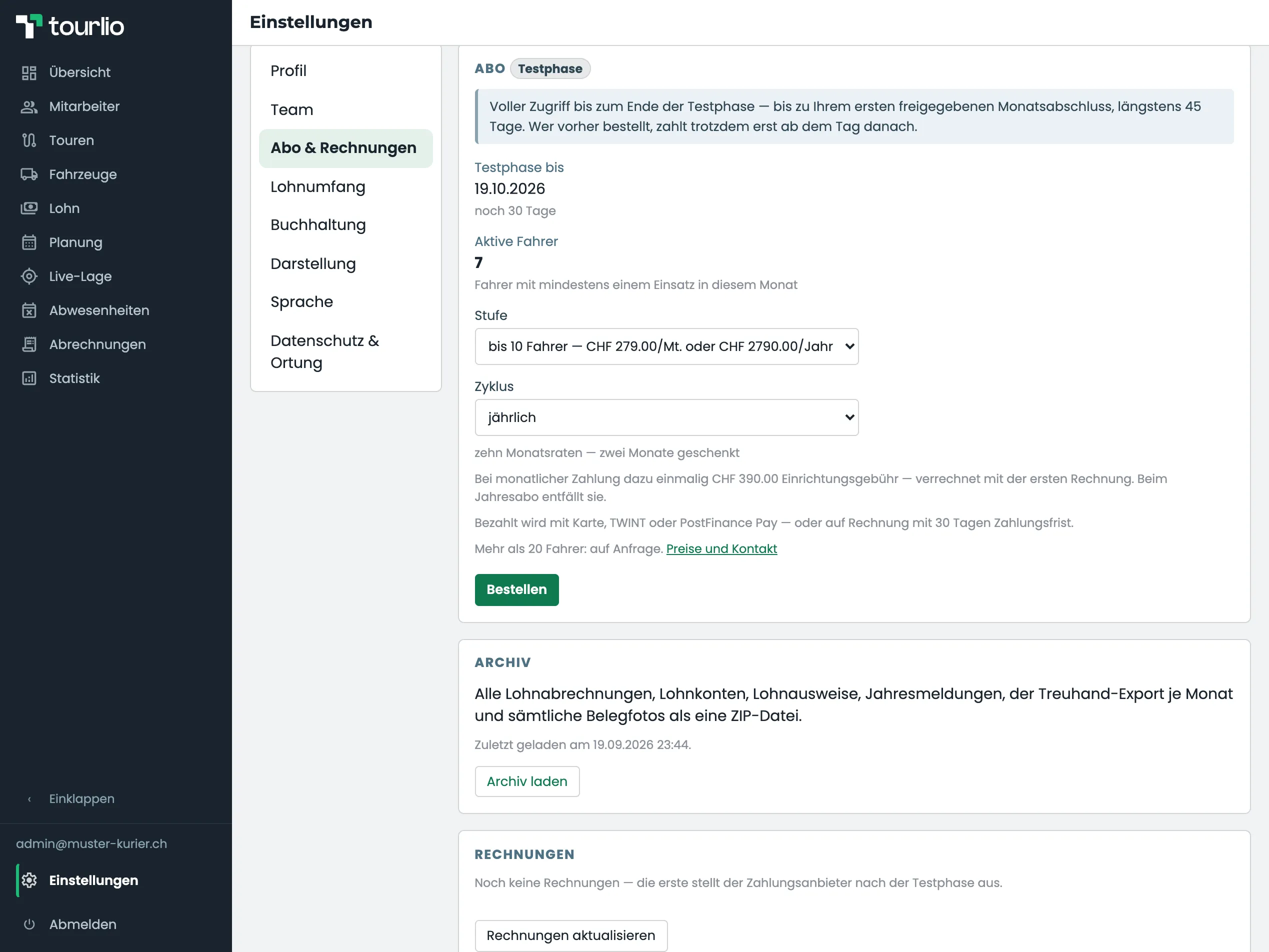
Settings → subscription: under the subscription card with the trial end, tier, cycle and order button the card “Archiv” with the sentence on what the ZIP file contains, the note saying when it was last downloaded and the button to download it; below it the card for the invoices.
Settings · Subscription

Your data stays yours

When your contract ends, you have 90 days to download the paperwork of your business as a ZIP: released statements, receipt photos, the export for your fiduciary — and, if you run the social deductions in Tourlio, wage accounts, salary certificates and the three annual declarations. The archive itself says what is in it and what is not. After that it is deleted, and deleted means gone.

From your drivers’ side

Three taps, not a training day.

The driver’s view is cut back to what is needed: open it in the phone browser, log in, start the tour, enter the day, finish. Nothing to install, nothing to update. A native app for iOS and Android is being built — it will make photographing receipts steadier and keep positions without a signal, not add to what the system does.

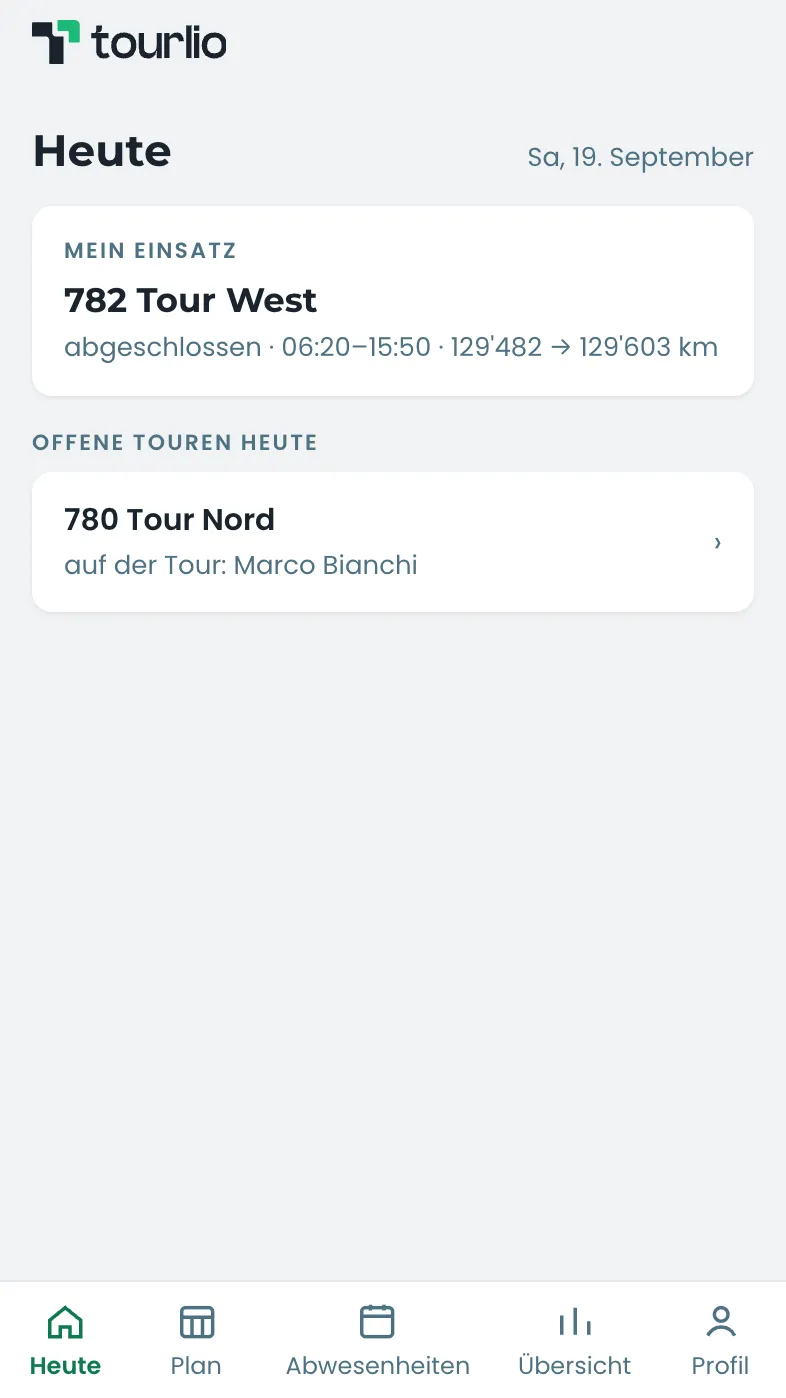
Today’s tour, nothing else — and next to it the shared tour a second driver can join.
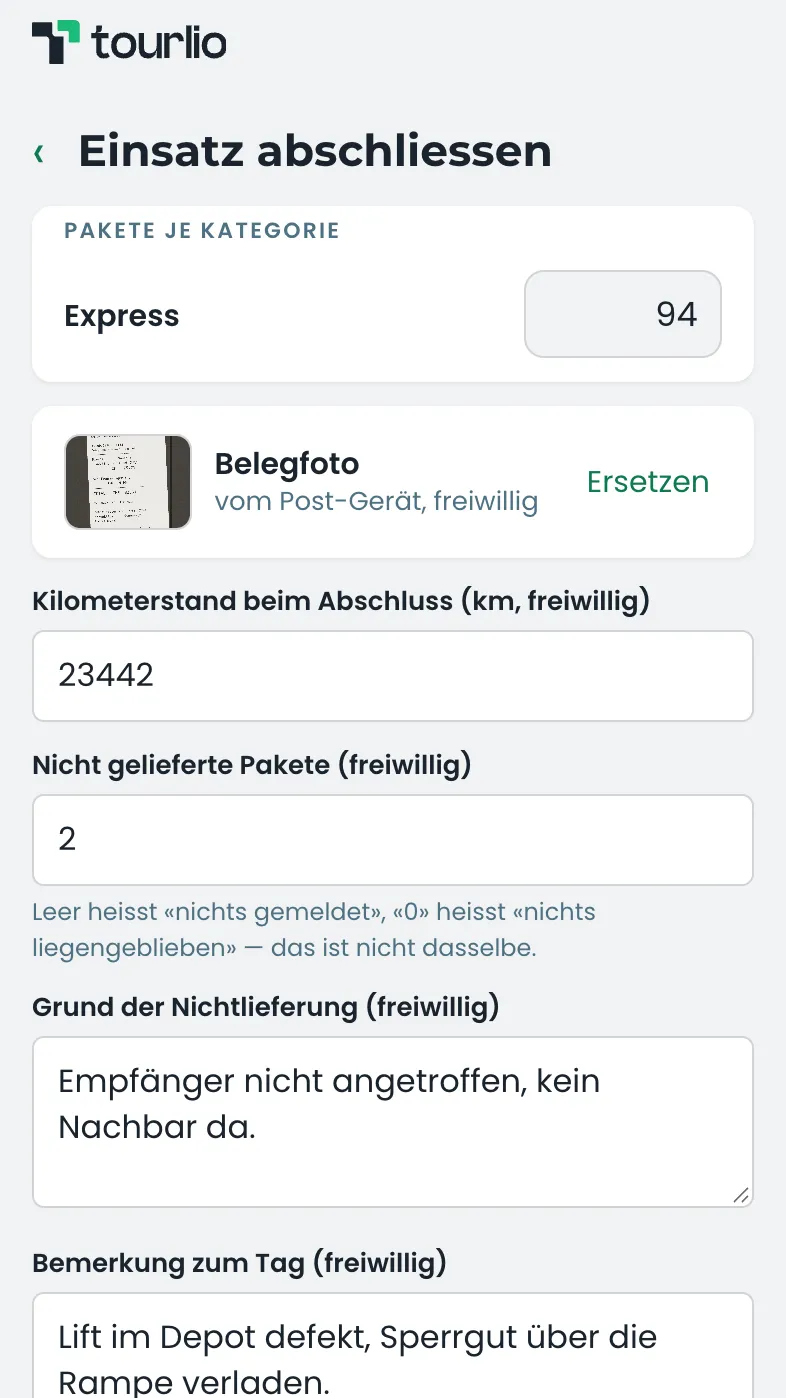
Parcels per category, a receipt photo, the odometer, whatever was left behind, a note — done.
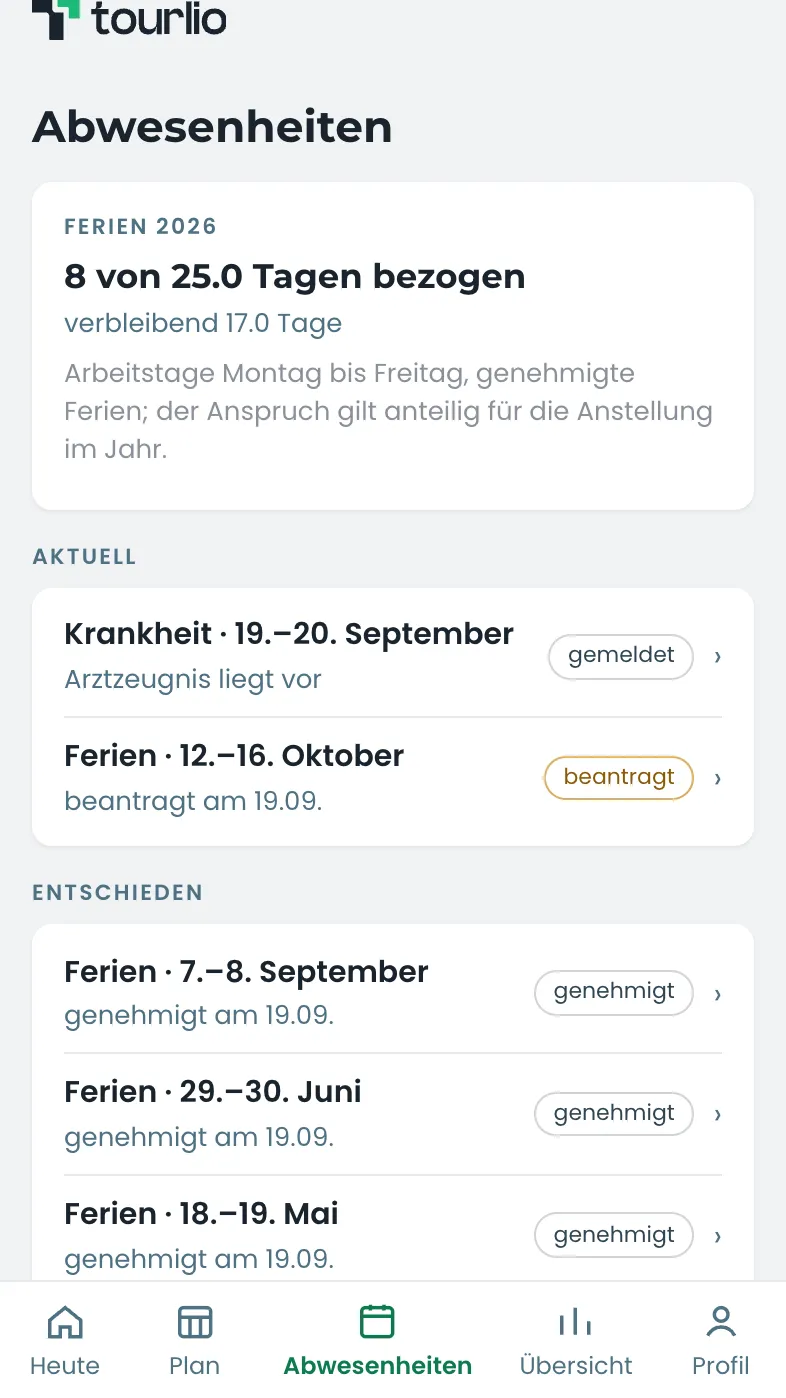
Report sick with a doctor’s note, request holiday — it reaches the office at once.
At month-end

The recorded days become the pay.

What your drivers record in the vehicle, Tourlio turns into the monthly statement — through to net pay, with social security and withholding tax.

Ready for statements on time and less office work?

CHF 390.– setup fee, waived with yearly billing. Cancel monthly. Pay only for the drivers who actually drive.

See pricing and plans